
By KidCue Editorial TeamUpdated 10 min read
Choiceworks vs KidCue: Which Fits Your Child?
Choiceworks costs $24.99 once; KidCue is free to start. Compare schedule boards, photo steps, Kid Mode, and which app fits your child.
Choiceworks and KidCue are both visual support apps for children who need routines to be easier to see. They are built for different jobs, and the difference matters more than the feature list.
Prices and ratings were checked in the US App Store on November 11, 2026. Both apps change, so confirm the current listing before you buy. The visual schedule app pricing table tracks the same figures for both apps.
Quick answer
- Choiceworks is the broader visual-support toolkit. It has schedule, waiting, feelings, and Feelings Scale boards, with custom pictures, video, audio, and text. It costs $24.99 once and has no subscription.
- KidCue is the routine-first app. It turns photos of real objects into step images, runs the routine in Kid Mode, and keeps edits behind parent verification. The free tier covers one child and three routines.
If your child needs waiting and feelings support as much as a routine, Choiceworks covers more ground. If your child needs to run a daily routine with less adult narration, KidCue is built around that job.
| App | Best for | Price | Rating (US) |
|---|---|---|---|
| Choiceworks | Schedule, waiting, feelings, and Feelings Scale boards | $24.99 one time | 4.6 (311 ratings) |
| KidCue | Photo-based routines a child can run in Kid Mode | Free; Pro $9.99/month, $39.99/year, or $129.99 lifetime | 4.6 (15 ratings) |
Is KidCue a Choiceworks alternative?
Yes, for daily routines. KidCue covers the routine job: photo steps, Kid Mode, timers, and reminders. It does not replace the waiting, feelings, and Feelings Scale boards in Choiceworks.
If you searched for a Choiceworks alternative because you want the child to run a routine without adult narration, KidCue is the closer fit. If you need the full board toolkit, Choiceworks remains the broader app.
What each app is
Choiceworks
Choiceworks is a visual support app from Bee Visual. It has been on the App Store since 2011 and won a 2026 Gold Anthem Award for App Excellence in Technology.
The app is built around boards:
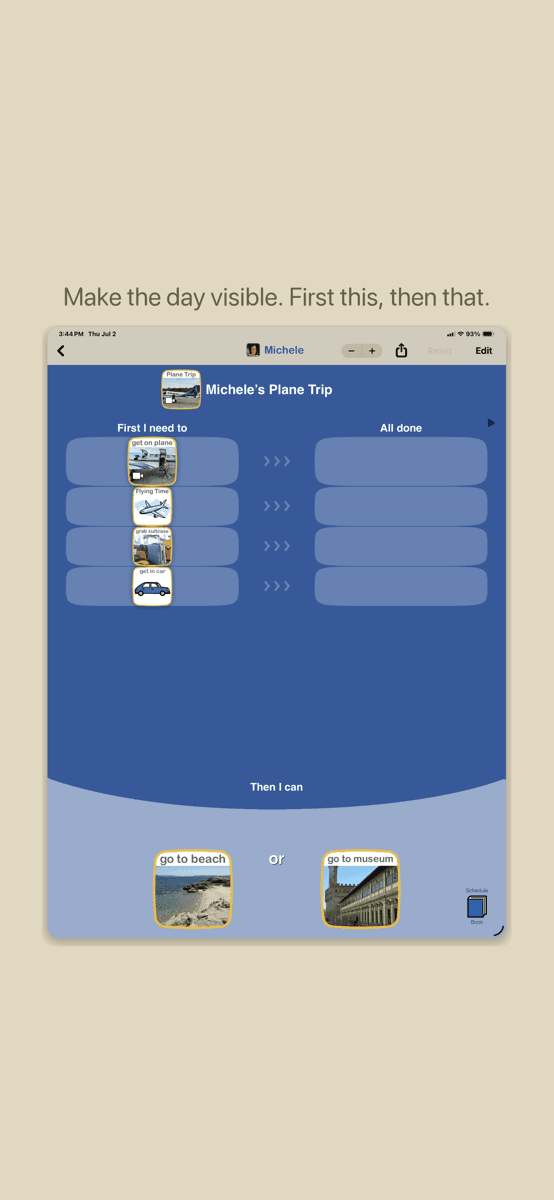
- Schedule board: a to-do column, an all-done column, and a visual timer.
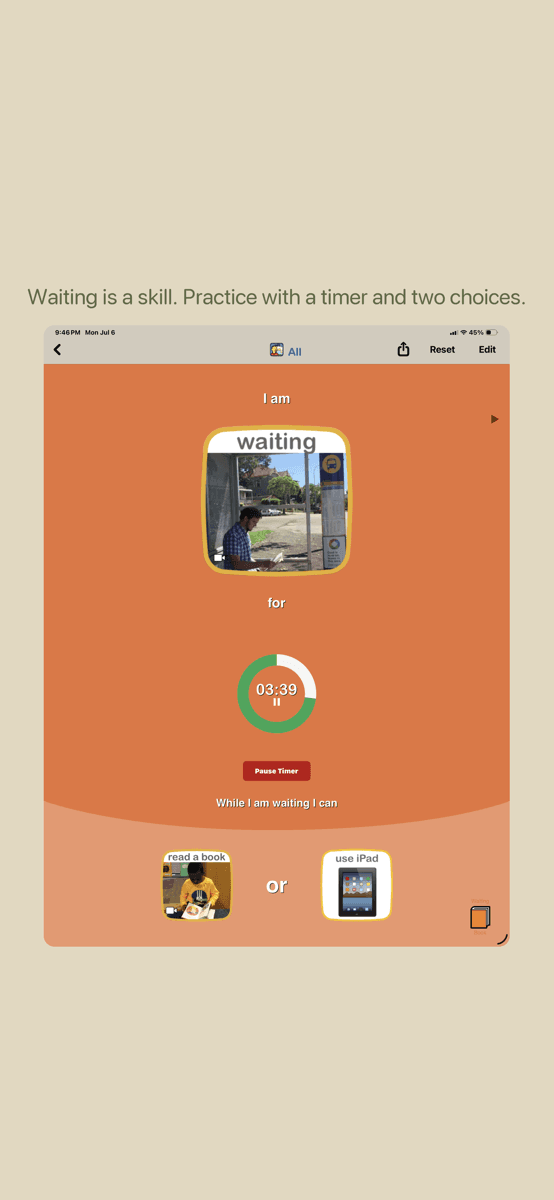
- Waiting board: a timer plus two activity choices for the wait.
- Feelings board: feelings cards and response choices.
- Feelings Scale board: how big a feeling is and what may help at each level.
Boards can use built-in symbols or your own pictures, video, text, and recorded audio. The app supports multiple profiles, board import and export, AirDrop, Files, email, and optional iCloud sync. The listing says one purchase includes everything, with no subscriptions, ads, tracking, or accounts.
KidCue
KidCue is a routine app for iPhone and iPad. It is built around a vertical list of steps rather than a board.
You take a photo of the real object — the toothbrush, the shoes, the backpack — and KidCue turns it into a sticker-style image for the step. You put the steps in order, add a timer where transitions break, and hand the device to the child in Kid Mode.
KidCue also includes First-Then routines, reminders, and a visual timer. The criteria for choosing a routine app are covered in the visual schedule app for autism guide. The paid plan adds unlimited routines, profiles for up to 8 children, iCloud sync, and sticker export. There are no ads, and no account is required to start.
Who each one is for
| Need | Choiceworks | KidCue |
|---|---|---|
| A daily routine a young child runs alone | Possible, with adult setup | Built for this |
| Waiting practice with a timer and choices | Yes | Not a board type |
| Feelings and feelings intensity | Yes, two board types | No |
| Video, audio, and text on cards | Yes | Photos, stickers, and emoji |
| One-time purchase | Yes, $24.99 | No; free tier plus Pro |
| Children, teens, and adults | Yes, per the listing | Toddlers through early elementary |
| Therapist or teacher sharing boards | Yes, import/export | Sticker images only |
| A free way to try before paying | No | Yes |
Choiceworks is the better fit for a family, classroom, or clinic that needs one app for several kinds of visual support. KidCue is the better fit for a parent who wants one routine to stop depending on repeated verbal prompts.
Design differences
Board versus routine list
Choiceworks thinks in columns and cards. The child moves a card from "First I need to" to "All done." That model is flexible, and it fits classrooms, therapy sessions, and mixed sequences.
KidCue thinks in a single routine. The child sees one vertical list, checks off the current step, and moves down the list. There is less to scan and fewer setup decisions, which helps when the goal is a repeatable morning or bedtime.
Neither model is better in general. The board is more adaptable; the list is faster to run.
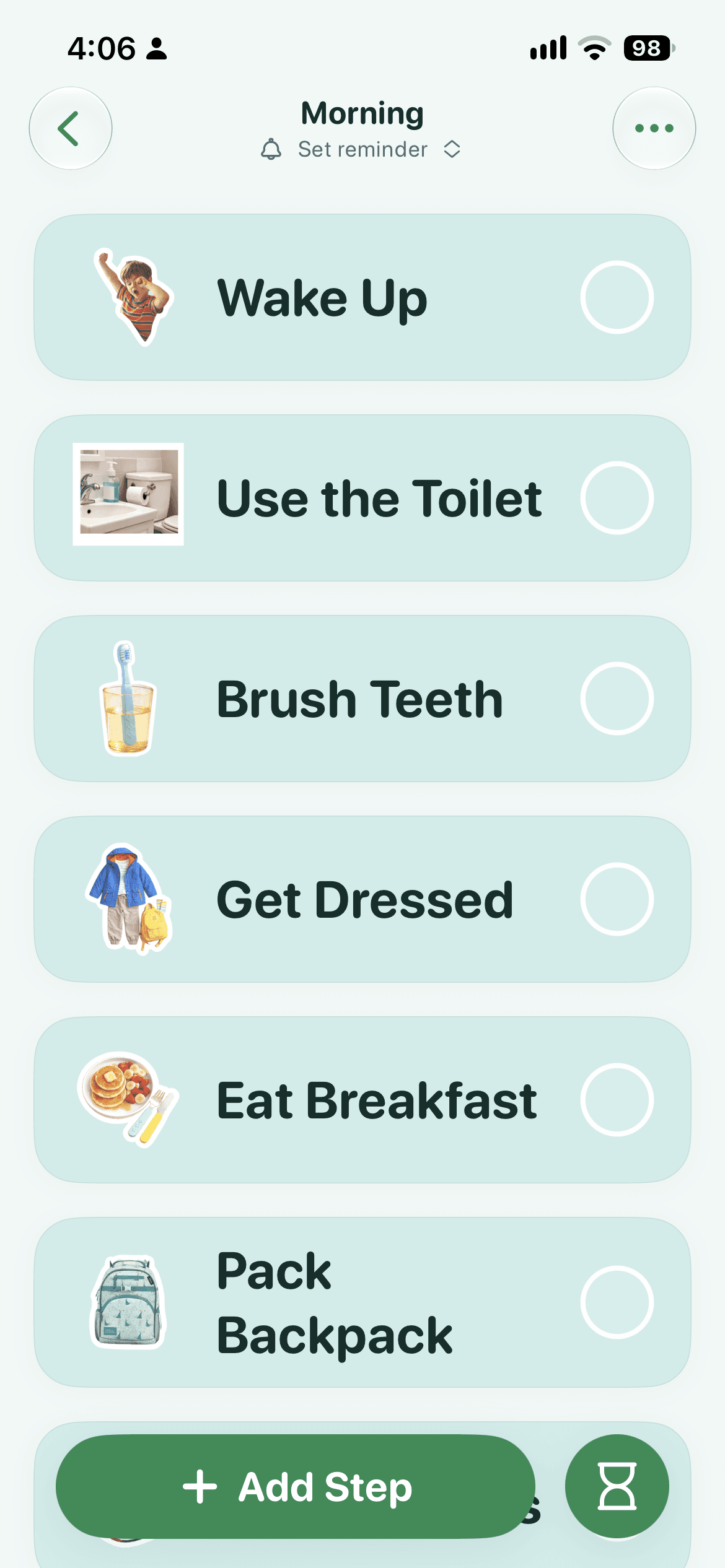
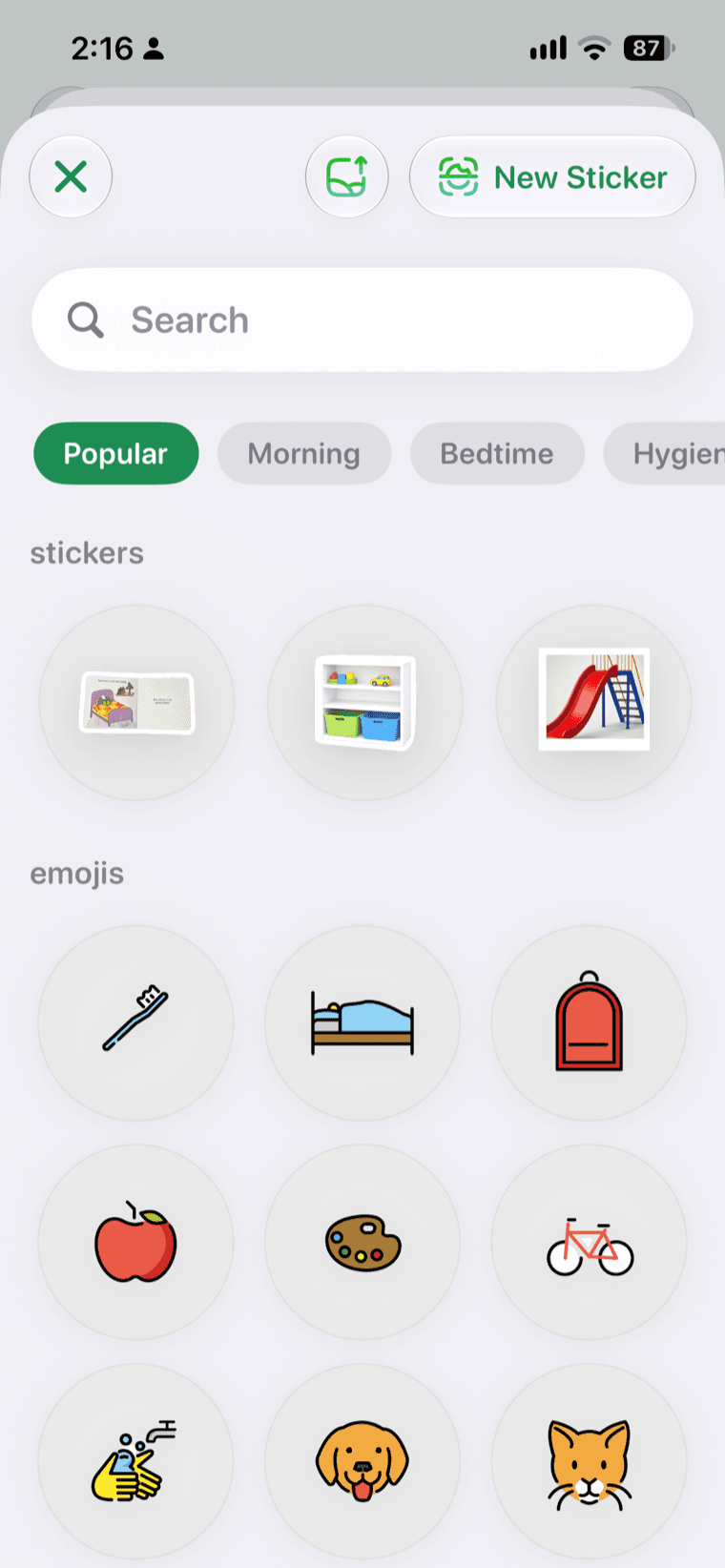
Photo steps: both apps use them, at different speeds
Choiceworks can use your own pictures, video, and audio. That is real customization, and it is one reason therapists keep it.
KidCue's difference is the path from object to step. You point the camera at the object, and the app makes a sticker-style image. You do not search a symbol library or crop a photo by hand. For a parent setting up a routine on a phone, that is the difference between a five-minute setup and a twenty-minute one.
If you want video, recorded audio, or a reusable card library, Choiceworks does more. If you want a photo of the actual coat turned into a step before the child loses interest, KidCue is faster.
Child independence
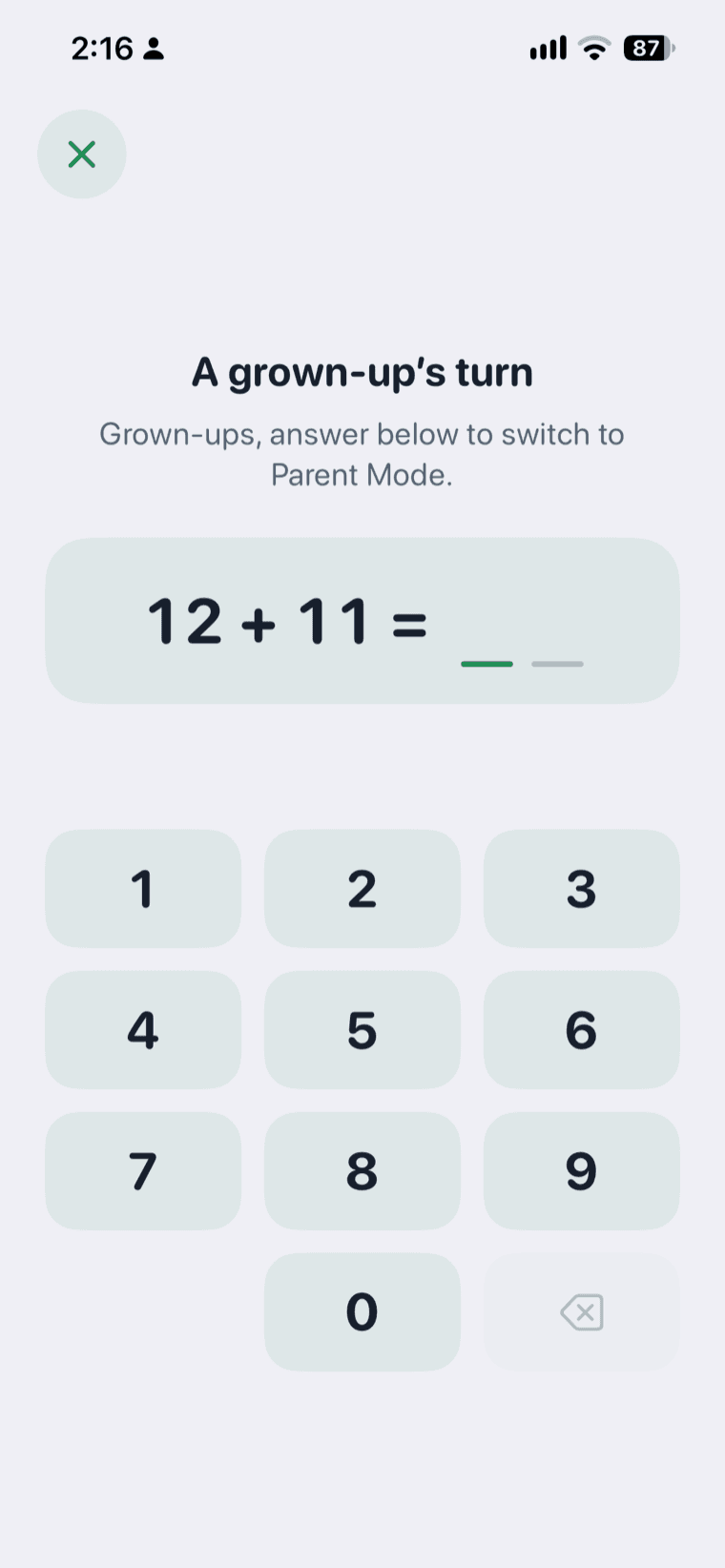
KidCue separates the adult's view from the child's. In Kid Mode, the child sees the routine, checks off steps, and follows the timer. Switching children and managing stickers stay behind parent verification.
Choiceworks uses multiple profiles and customizable boards. The listing does not describe a child-locked mode or a parent gate, so the adult usually stays involved in opening and running the right board.
That is the clearest design difference between the two apps. KidCue is built to hand over; Choiceworks is built to build with.
Where KidCue changes the routine
KidCue's advantage is not one feature. It is the combination of four decisions:
- The step starts with the object. You photograph the real toothbrush or backpack. The cue is the thing the child already knows.
- The child runs the screen. Kid Mode gives the child the routine, the check-off, and the timer without the editing controls.
- The parent keeps the controls. Parent verification protects child switching and sticker management.
- The free tier removes the purchase decision. One child, three routines, and unlimited steps are free. You can test the setup before paying.
For a family whose main problem is "I have to say every step out loud," that combination addresses the actual job. It does not add waiting boards or feelings cards, because that is not the job it was built for.
Where Choiceworks is the better tool
Choiceworks wins in five situations:
- Waiting is the hard skill. The waiting board pairs a timer with two choices. KidCue has a timer but no waiting board.
- Feelings need their own visual support. Choiceworks has feelings and Feelings Scale boards. KidCue does not.
- You need video or recorded audio. Choiceworks supports both. KidCue uses photos, stickers, and emoji.
- You want one purchase. $24.99 once, with no subscription. KidCue Pro is $39.99 per year or $129.99 lifetime.
- You work with a therapist or teacher. Choiceworks boards can be exported and shared. KidCue can export sticker images, not full board files.
The 2026 Anthem Award and the 311 ratings are also evidence that Choiceworks has been tested across many settings. KidCue's 15 ratings are early signal, not a track record.
What users report
Choiceworks holds 4.6 from 311 ratings. One reviewer describes it as "one of the best schedulers out there" and lists custom pictures, waiting boards, feelings boards, and profiles as the reasons.
The written reviews also include a specific complaint: the app keeps the screen awake, which drains the battery on a shared device. The developer responded that the board is designed to stay visible. If the device is also used for AAC or other supports, that is worth knowing before you commit.
KidCue holds 4.6 from 15 ratings. The sample is small, so treat it as early feedback. The most concrete evidence is the listing itself: the free tier, the Pro features, and the version history showing Kid Mode, family sharing, and reminders added through 2026.
Common Sense Media's review of Choiceworks calls the schedule board the most successful part and describes the topics as disjointed. The app has since added a fourth board type, so part of that critique may be out of date.
Cost over time
| Period | Choiceworks | KidCue free | KidCue Pro yearly |
|---|---|---|---|
| First year | $24.99 | $0 | $39.99 |
| Three years | $24.99 | $0 | $119.97 |
| Five years | $24.99 | $0 | $199.95 |
KidCue lifetime is $129.99 once. Choiceworks is cheaper than KidCue Pro after the first year. KidCue's free tier is cheaper than both if one child and three routines are enough.
Which one should you choose?
Choose KidCue if:
- Your child is a toddler or early elementary age.
- The main problem is a daily routine that depends on your voice.
- You want the child to run the routine without editing it.
- You want to try the setup before paying.
- You are on iPhone or iPad.
Choose Choiceworks if:
- You need waiting, feelings, or Feelings Scale support.
- You want video, recorded audio, or a reusable card library.
- You prefer a one-time purchase.
- A therapist, teacher, or clinic already uses Choiceworks.
- You support children of different ages, including teens or adults.
Use both if: you want Choiceworks for waiting and feelings, and KidCue for the morning and bedtime routine. That is two purchases, so start with the problem that costs you the most each day.
How to test either app in a week
- Pick one routine that fails most often.
- Set it up with no more than five steps.
- Add a timer only at the step where the routine breaks.
- Run it once a day for five days.
- At the end of the week, change one thing: a step, a photo, or the timer length.
If the routine is smoother after a week, keep going. If nothing changes, the app is not the missing piece, and the next step is to look at the environment and the support around the child.
Related comparisons and guides
- Visual schedule app for autism
- 5 best apps for autistic kids
- KidCue vs Goally Tablet
- Lil Planner alternatives
- Visual schedule for kids
- Free timer tools
FAQ
Can Choiceworks use real photos? Yes. Choiceworks supports custom pictures, video, text, and recorded audio on its cards.
Does KidCue have feelings or waiting boards? No. KidCue is a routine app with First-Then, timers, and reminders. It does not include waiting or feelings boards.
Which app is cheaper? Choiceworks is $24.99 once. KidCue has a free tier and Pro at $39.99 per year or $129.99 lifetime. Over three years, KidCue Pro costs more than Choiceworks.
Does KidCue work on Android? No. KidCue runs on iPhone and iPad. Choiceworks is also iOS only.
Can my child use either app alone? KidCue has Kid Mode with parent verification on edits. Choiceworks uses profiles and customizable boards; its listing does not describe a child-locked mode.
How much does Choiceworks cost? $24.99 in the US App Store, as a one-time purchase with no subscription. Check the current listing for your region.
Does Choiceworks have a free trial? No. Choiceworks is a paid app with no free tier. KidCue has a free tier, which is one reason families compare the two before paying.
Is there a Choiceworks app for Android? No. Choiceworks is available on iPhone and iPad. KidCue is also iOS only.
Sources
- Choiceworks, US App Store listing, checked November 11, 2026
- KidCue, US App Store listing and kidcue.app, checked November 11, 2026
- Common Sense Media, "Choiceworks"
- App screenshots are from each app's public App Store listing and are used for identification only
Try the routine-first approach on iPhone or iPad.
Build one routine from real photos, run it in Kid Mode, and add a timer only where the transition breaks.
Related Topic Hubs
If this post helped, these curated hub pages can guide your next steps.