 KidCue
2026-06-27
ADHD Leaving the House Checklist: Let the Door Remember
An ADHD leaving the house checklist that uses real images, visible cues, and a door-side reset so you stop relying on working memory.
The ADHD leaving-the-house tip that changed the most for me was simple: make the environment remember, not my brain.
I keep one short visual checklist exactly where the problem happens. Before I leave, I check keys, wallet, phone, medication, and sun cream. Real pictures work better for me than a plain text list because I recognize the objects faster.
The system at a glance
| Part | What I use | Why it helps | | --- | --- | --- | | Location | By the door | The cue appears when I need it | | Format | Real object photos plus short labels | Recognition takes less effort than recall | | Length | Five essentials | The list stays scannable | | Action | Tap each item after checking it | I can see what is still missing | | Reset | Clear every check after returning home | The list is ready for the next departure |
This is not a complete packing list for every possible day. It is a last check for the things I most regret forgetting.
Why leaving the house can unravel so quickly
Leaving is not one task.
It is a stack of small tasks happening while time pressure is rising: find the keys, remember why I opened the cupboard, check the weather, refill water, locate my wallet, and avoid getting pulled into something unrelated.
A reminder that lives only in my head is easy to lose somewhere in that stack. A reminder attached to the exit is harder to miss.
The distinction that helped me was this:
- Recall: “What am I forgetting?”
- Recognition: “I can see my medication on the list. Do I have it?”
The first question is open-ended. The second gives my attention somewhere specific to land.
My five-item ADHD leaving check
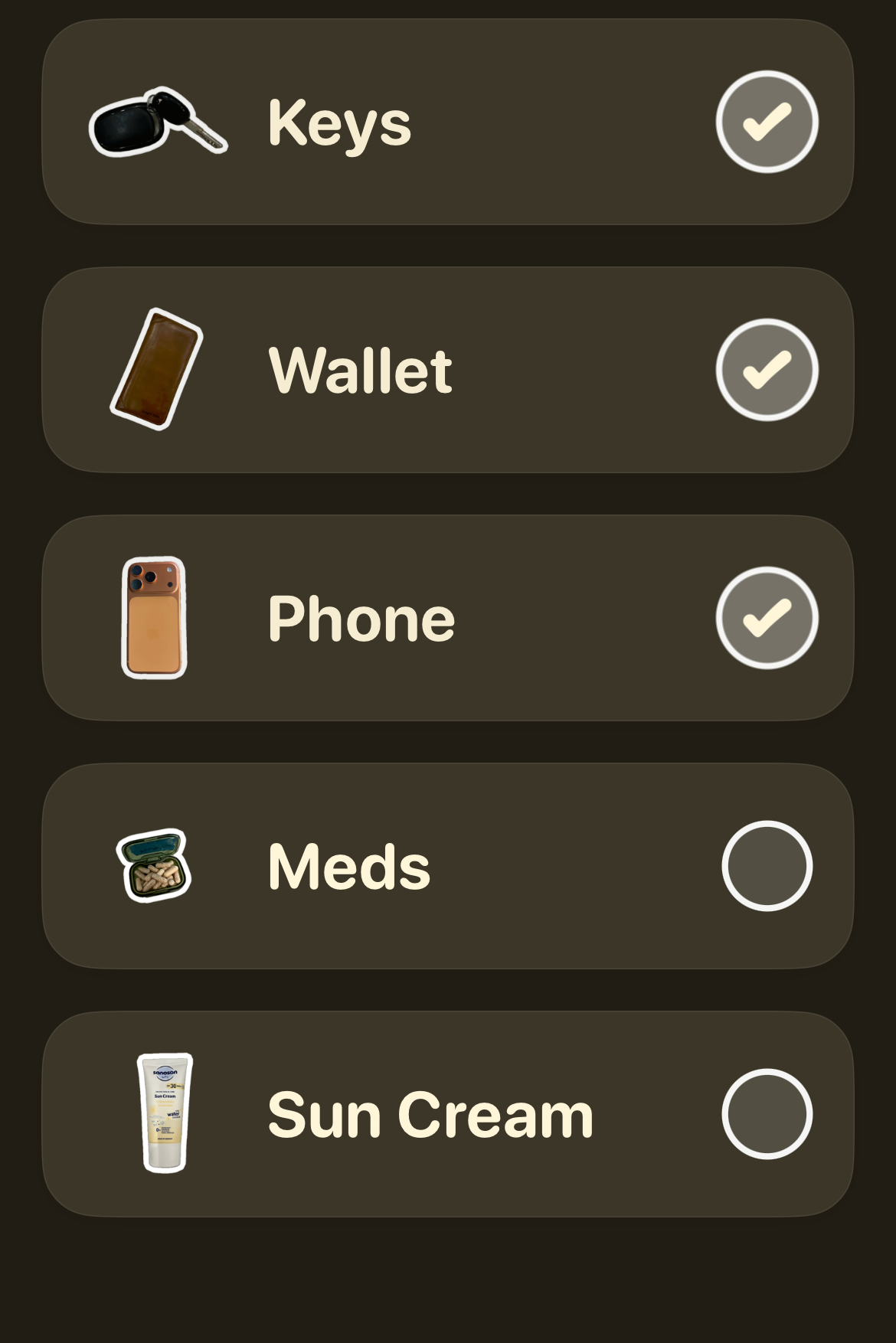
My default list is deliberately boring:
- Keys — physically touch them before checking the item.
- Wallet — confirm it is in the bag or pocket I am taking today.
- Phone — check that I have the phone, not only that I remember seeing it.
- Meds — take them or pack them according to my normal plan.
- Sun cream — apply it or put it in the bag when the day requires it.
The important part is not my exact five items. Your list might include glasses, work pass, headphones, water, or your child’s medication.
Choose the essentials that repeatedly send you back through the door.
Make your own leaving check in KidCue.
Use photos of the objects you actually carry, keep the routine short, and check each item before you go.
Put the checklist where the forgetting happens
A good checklist in the wrong place becomes invisible.
If I build the list while sitting on the sofa but never see it at the door, it cannot help at the decision point. The cue needs to live where I naturally pause before leaving: beside the coat, above the shoe rack, or on the phone screen I use at the door.
This is the same principle behind a useful launch pad:
- keys have one hook,
- wallet has one tray,
- medication has one safe, consistent place,
- the checklist points me to those places.
The environment does not need to look perfectly organized. It needs to make the next action obvious.
Use real images when text becomes background noise
Text lists work for many people. Mine eventually started to blend into the room.
A photo of my actual keys catches my eye faster than the word “keys.” It also removes ambiguity. I am not looking for a generic idea of keys; I am looking for that black key fob.
To make a visual list easy to scan:
- use one object per image,
- remove distracting backgrounds,
- keep labels to one or two words,
- use the same order every day,
- keep the list short enough to see without scrolling.
Real photos are not required, but they are worth testing if icons or text have become easy to ignore.
Add variable items without making the list endless
The daily essentials stay fixed. Temporary items go in one extra slot.
For example:
- Monday: laptop charger
- Tuesday: return parcel
- Wednesday: gym shoes
- Thursday: appointment letter
I do not rebuild the whole routine for each plan. I add one visible “today” item and remove it when I get home.
That keeps the base list familiar while still catching the unusual thing most likely to be forgotten.
The reset is part of the routine
A checked-off list is reassuring on the way out and useless the next morning.
So returning home includes one tiny reset:
- Put essentials back in their assigned places.
- Clear the completed checks.
- Add tomorrow’s unusual item if I already know it.
The reset takes less effort than reconstructing the system while late.
If mornings are the bigger problem, pair this leaving check with a visual ADHD morning routine or a visible departure timer. The checklist answers “what do I need?” while the timer answers “how long do I have?”
What to do when the checklist stops working
Do not immediately conclude that you failed the system.
First check the system itself:
- Has the list become too long?
- Is it hidden behind an open door or a pile of coats?
- Are the pictures too similar?
- Are you checking items without physically confirming them?
- Does the list need to move closer to the final exit?
Visual cues can fade into the background. Moving the checklist, changing one image, or cutting it back to three essentials may make it noticeable again.
Key takeaways
- Put the reminder at the point of action, not where you happen to plan it.
- Ask for recognition instead of relying on open-ended recall.
- Use real object photos if text is too easy to overlook.
- Keep the permanent list short and add only one variable item.
- Reset the checklist when you return, not during the next rushed departure.
FAQ
What should be on an ADHD leaving-the-house checklist?
Start with three to five essentials you repeatedly forget, such as keys, wallet, phone, medication, glasses, or a work pass. Add weather-specific and one-off items only when needed.
Where should I put the checklist?
Place it at the final decision point: beside the front door, shoe rack, coat hook, or on the device you check immediately before leaving.
Are pictures better than words for an ADHD checklist?
Not for everyone. Pictures can help when text has become visual background or when recognizing a familiar object is faster than reading and interpreting a label. Try both and keep the format you actually notice.
Should I use a paper list or an app?
Use whichever stays visible and is easiest to reset. Paper can be hard to miss; an app can reuse routines, show real photos, and handle changing items. The location and consistency matter more than the medium.
How do I remember items that change each day?
Keep one “today” slot beside the permanent essentials. Add the return parcel, lunch, charger, or appointment letter there without expanding the whole daily list.
What if I check an item and still leave it behind?
Change the rule from “I remember where it is” to “I physically touched it or put it in my bag.” The check should confirm an action, not an intention.
Let the door carry the memory
I used to stand at the exit asking myself, “What am I forgetting?”
That question rarely produced a useful answer. It mostly produced panic.
Now the door gives me five specific prompts. I do not need to feel perfectly focused or hold the whole departure in working memory. I only need to look, confirm, and go.
Not fancy. Just hard to miss.
Turn your real essentials into a visual routine.
Build a short photo checklist in KidCue and let the environment carry the final leaving check.
Related Topic Hubs
If this post helped, these curated hub pages can guide your next steps.