 KidCue
2026-06-24
Preschool Visual Schedules Should Use Real Photos, Not Generic AI Images
Parents and teachers are right to be cautious about AI-generated preschool resources. For visual schedules, real objects and real photos are often clearer for young children.
Parents are starting to notice something in daycare ads, preschool handouts, therapy clinic posters, and teacher resource packs:
A lot of the visuals look AI-generated.
Sometimes it is obvious.
Sometimes it is just a feeling.
The child’s face looks a little too smooth.
The hands look wrong.
The classroom looks polished but not real.
The coloring sheet has strange details.
The visual schedule card looks cute at first glance, but the object is not quite recognizable.
And for preschoolers, that “not quite” matters.
This is not about being anti-technology.
It is about whether the visual actually helps a young child understand what to do next.
A preschool visual is not decoration
A visual schedule is not wall art.
It is not a branding asset.
It is not there to impress adults.
For a young child, a visual schedule is a support tool.
It helps answer:
- What am I doing now?
- What happens next?
- Where am I supposed to go?
- What object do I need?
- When is this routine finished?
If the image is vague, uncanny, too stylized, or not connected to the child’s real world, the child has to do extra work to decode it.
That is the opposite of what a visual support should do.
A good visual should reduce interpretation.
It should make the next step easier to recognize.
Why generic AI images can fail young kids
AI-generated visuals often look “good enough” to adults scanning a resource pack.
But young children do not always process pictures the way adults do.
They may rely on concrete details:
- the exact color of their rain boots
- the shape of their classroom cubby
- the real sink where they wash hands
- the actual backpack they carry
- the toothbrush cup they see every night
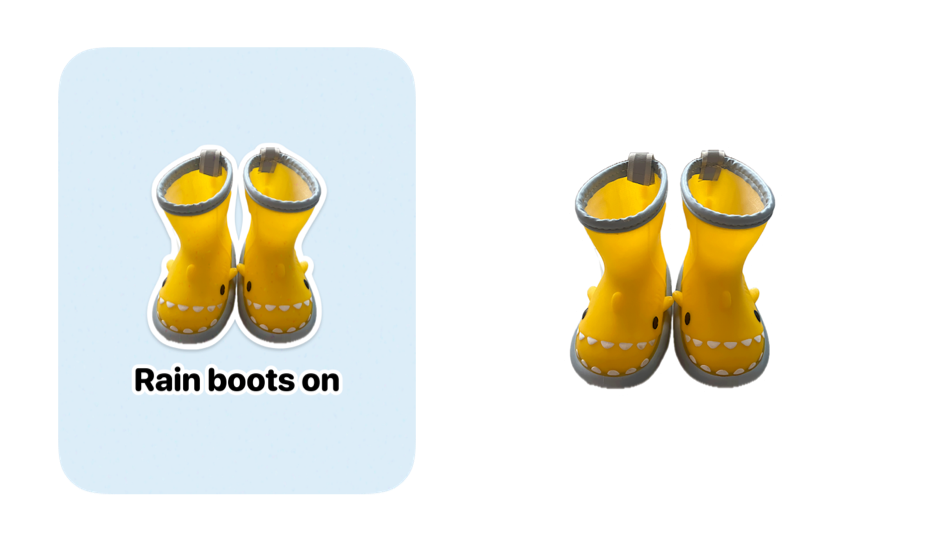
If a schedule card says “rain boots on” but shows a generic pair of fantasy boots, the adult may understand it.
The child may not.
Or the child may understand it more slowly.
Or the child may argue because it does not match what they know.
For preschool routines, recognition is the point.
Real beats impressive.
Parents and teachers are not overreacting
When parents push back on AI-filled preschool resources, it can sound like a taste preference.
But there are practical reasons to be cautious.
In early childhood settings, visuals need to be:
- clear
- consistent
- familiar
- ethically sourced
- easy for staff to reuse
- aligned with how the child communicates
That last point matters especially for kids who use AAC.
If a child uses a communication device with a specific symbol system, classroom visuals should not casually drift into random AI art just because it looks cute.
Consistency supports understanding.
A child should not have to decode one image style on their AAC device, another on the classroom schedule, another on a therapy handout, and another on a parent info poster.
The adults may see variety.
The child may feel noise.
Use real objects when the routine is about real objects
For many preschool routines, the best visual is not a generated image.
It is a photo of the actual thing.
The actual rain boots.
The actual lunchbox.
The actual classroom door.
The actual bathroom sink.
The actual nap mat.
The actual coat hook.
This is especially helpful for children who are still building language, children who use AAC, autistic children, ADHD children, and kids who struggle with transitions.
They do not need the most beautiful picture.
They need the clearest cue.
That is why a simple phone photo can be more useful than a polished AI image.
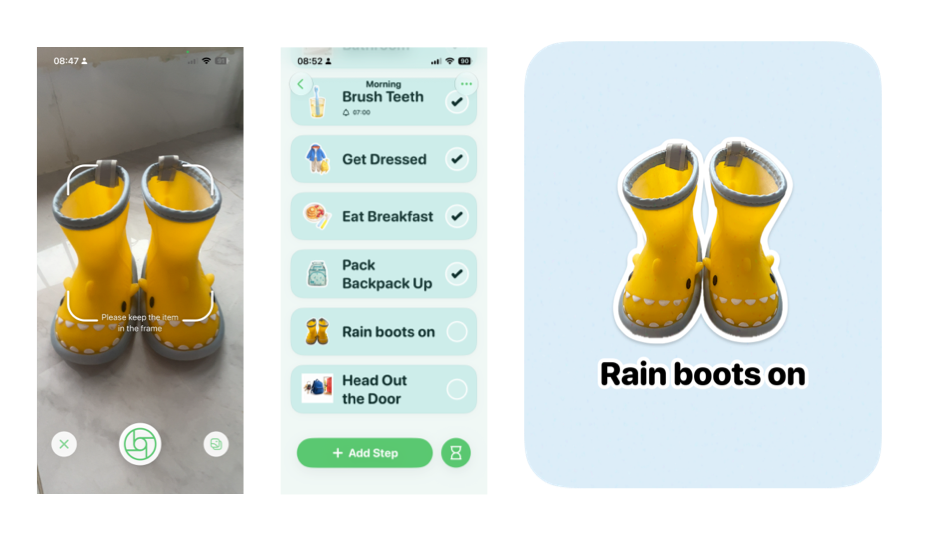
A better workflow: photo -> sticker -> schedule
One practical approach is:
Take a photo of the real object.
Turn it into a clean sticker.
Use it inside the child’s visual schedule.
Print it if needed.
That gives parents and teachers a visual that is:
- familiar to the child
- specific to the routine
- reusable across home and school
- easier to trust than mystery internet art
- less visually noisy than a raw photo
The sticker style can still look friendly.
But the source stays grounded in reality.
What teachers need is not more AI content
Teachers are already overloaded.
They do not need another resource library full of images that look polished but require extra checking.
They need visual supports they can trust quickly.
That means:
- no strange hands
- no fake children
- no confusing object details
- no unclear licensing
- no image style that changes every card
- no visuals that conflict with AAC systems already in use
If a school has access to a reputable AAC symbol system, that may be the right choice for many classroom-wide supports.
If the routine is personal or object-specific, real photos may be better.
The decision should be based on the child’s understanding, not on what looks trendy in a resource marketplace.
What parents can ask a preschool or clinic
If you are a parent and you notice AI-generated preschool visuals, you do not have to make it a culture-war conversation.
You can ask practical questions:
“Are these visuals connected to what the children actually see in the classroom?”
“Do you use the same symbols as the child’s AAC system?”
“Can we use real photos for routines my child struggles with?”
“Can we avoid generated child images in materials sent to families?”
“Who checks that visual schedule cards are clear for the children using them?”
Those are reasonable questions.
You are not asking for perfect design.
You are asking for visuals that do the job.
What to use instead
For preschool visual supports, I would use this order:
1. AAC-consistent symbols
Best when the child already uses a specific AAC system or the classroom needs shared communication symbols.
2. Real photos
Best for personal routines, real locations, real objects, and home-school consistency.
3. Simple hand-drawn or icon visuals
Useful when the concept is general and the style is very clear.
4. AI-generated images
Only if an adult carefully reviews them, the image is unmistakably clear, and it does not replace a more familiar option.
For low-age children, AI should not be the default.
It should be the last resort.
Make visual schedules from the real world.
KidCue lets families turn real objects and real routines into child-friendly visual steps, so the schedule feels familiar instead of generic.
A simple home version
If your child struggles with one routine, start with five photos.
Not fifty.
Five.
For example, for getting out the door:
- socks
- shoes
- jacket
- backpack
- door
For bedtime:
- toothbrush
- pajamas
- potty
- book
- bed
For preschool mornings:
- backpack
- lunchbox
- shoes
- car seat
- classroom door
Use real photos if you can.
Use the same words every time.
Keep the order stable.
Then watch which cards your child understands instantly and which ones need to be simplified.
That feedback is more useful than any perfect template.
The standard should be clarity
AI-generated content is spreading fast because it is cheap, quick, and visually polished.
But preschool support tools should be held to a different standard.
Not “does this look cute?”
Not “does this look modern?”
Not “can we generate 200 cards by Friday?”
The better question is:
Can this child recognize what this picture means when the routine is hard?
If the answer is no, the visual is not helping.
For young children, especially children who rely on visual supports, real-world clarity is not a nice extra.
It is the point.
Use the real boots.
Use the real sink.
Use the real classroom door.
Use the symbol system the child already knows.
Let the visual support feel like the child’s actual day.
That is how schedules become useful.
Not because they look impressive to adults.
Because they make the next step easier for the child.
Try a real-photo routine.
Build one simple visual schedule from objects your child already knows, then use the same cues every day.
Related Topic Hubs
If this post helped, these curated hub pages can guide your next steps.